Listen to your master and read the analysis
Compare the master with its pre-master mix and understand the live spectrum, level meters and loudness measurements.
In this guide
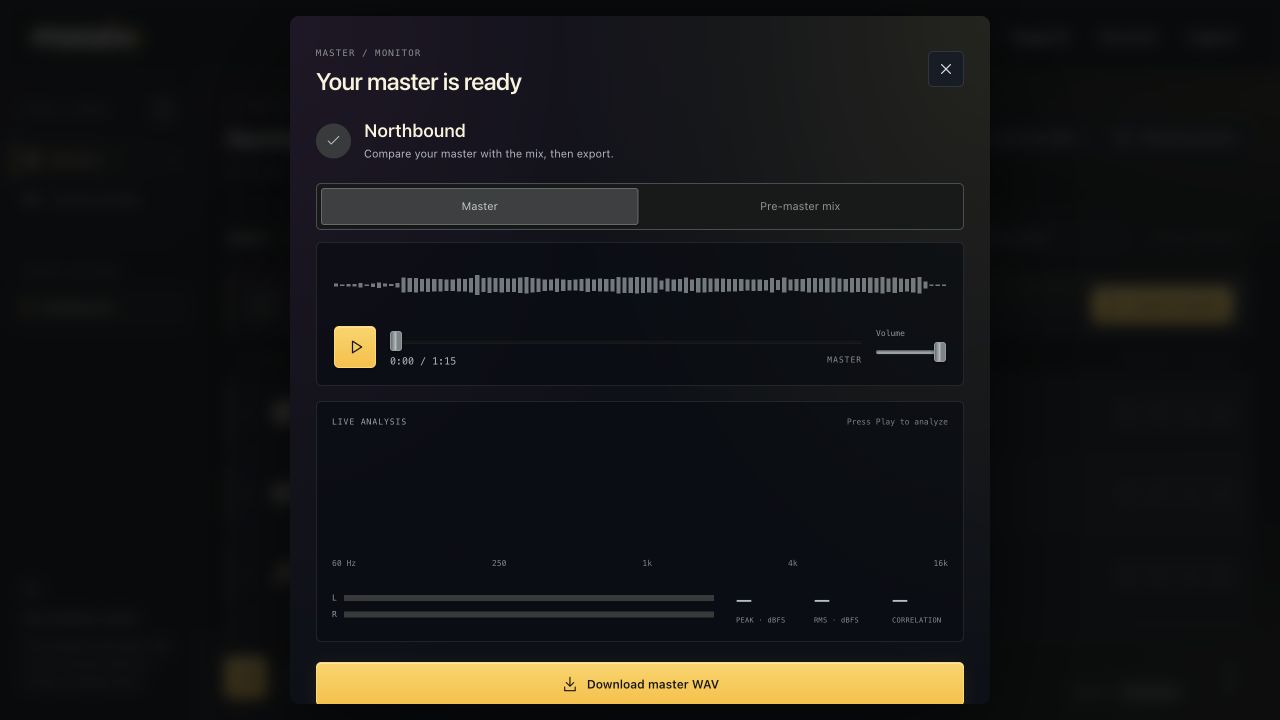
Listen before you download #
- Open the finished master with Listen to master.
- Press Play in the result player.
- Switch between Master and Pre-master mix to compare.
- Use the player timeline and volume controls as needed.
- Choose Back to adjustments if you want to change the song before exporting.
The master must be rendered again after relevant mix or mastering changes. An older downloaded file stays the older version.
Read live frequency and level displays #
Live analysis starts when you play the master. The frequency spectrum shows how energy is distributed across frequencies. The L/R meters show channel activity.
Peak · dBFS shows instantaneous peak level during playback. RMS · dBFS is a short-term level measurement. Neither is the same as the song's integrated LUFS.
Correlation helps describe the relationship between left and right channels. Read it with your ears: wide, reverberant or intentionally phasey material behaves differently from a centered mono vocal.
Read the measured master separately from the target #
Expand Mix measurements or Master measurements for the reported master loudness, pre-master loudness, duration and peak information where available.
A target is what was requested. Measured master is what the render achieved. If peak protection limited the result, the window says so. The live RMS display is not evidence that a −10 LUFS target was missed; they are different measurements.