Rename, replace and remove profile references
Keep a reference library organized and understand when an edit changes the sound of a session.
In this guide
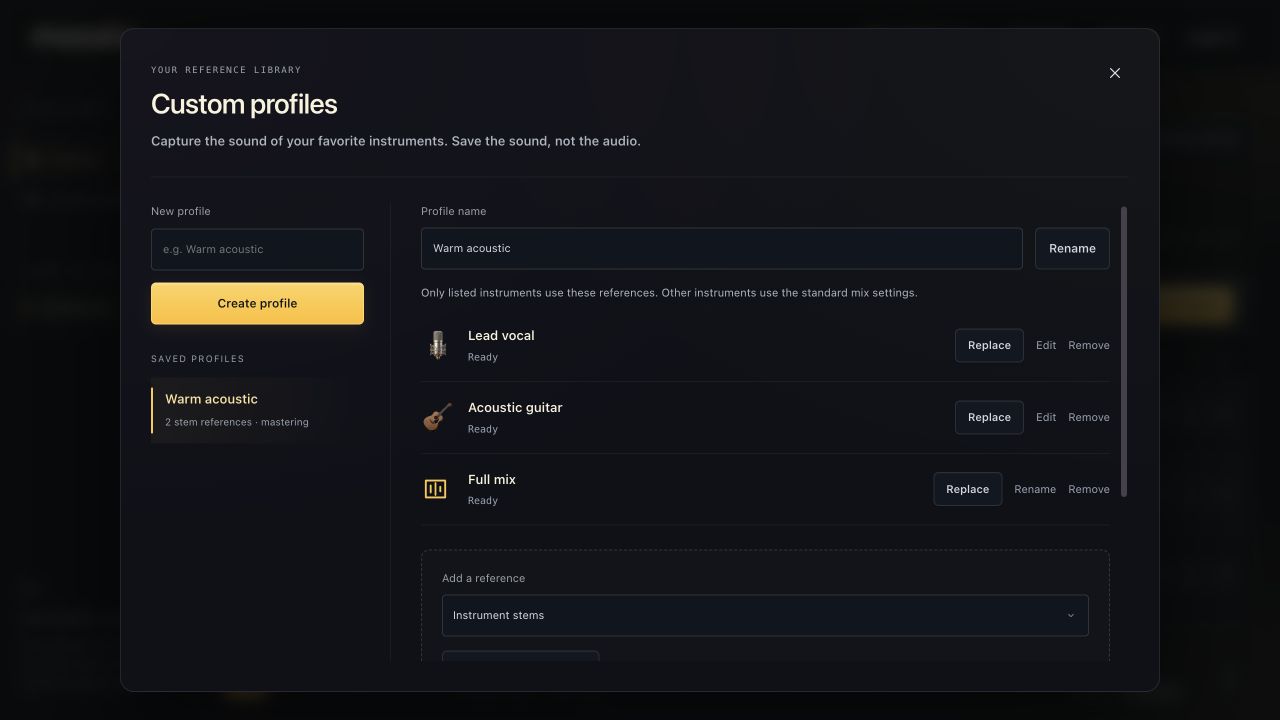
Rename a profile or reference #
- Open Custom profiles and select the profile.
- To rename the profile, edit Profile name and choose Rename.
- To rename a reference, choose Rename or Edit on its row, edit the name, then save.
A name change organizes the library; it does not change the captured audio measurements. Older broad references show familiar labels such as Vocals and Drums, not internal storage names.
Replace the reference sound #
- Choose Replace beside the target reference.
- Select the new audio file.
- Review the staged selection and analyze it.
- Wait for Ready before using the new sound.
During replacement analysis, the previous completed reference can remain usable; the status indicates when it is still in use. If analysis fails, retry with a valid file rather than assuming the failed replacement became active.
Change an instrument label or remove a reference #
For a specific instrument reference, Edit can change its name and instrument when the destination is not already represented. Older broad references and full-mix references offer naming rather than relabeling into a different target.
Choose Remove to remove one reference, or Delete profile for the entire profile. Review the confirmation. A removed reference no longer guides the matching stems; a removed profile falls back to standard choices where it was used.
Return to the session #
Reference changes update the profile choices in an open Studio session. Affected stems can show that they need a new mix pass; use Remix Changed once your changes are complete.
A mastering-reference change means the current song needs a new master to use it. Previously downloaded WAVs are separate files and are not changed retroactively.