Use Moozix on a phone or tablet
Upload from Files, work with the full-screen controls and save WAV downloads on mobile.
In this guide
Upload and keep the device awake #
- Open Moozix in a current browser and sign in.
- Start a mix or master.
- Use the upload action and select audio from the device's file picker/Files app.
- Stay in the browser until uploads finish.
A phone can suspend a background tab or local upload when locked. Large multitrack projects also need storage, network bandwidth and browser memory; a laptop may be more comfortable for a large session.
Use the mobile controls #
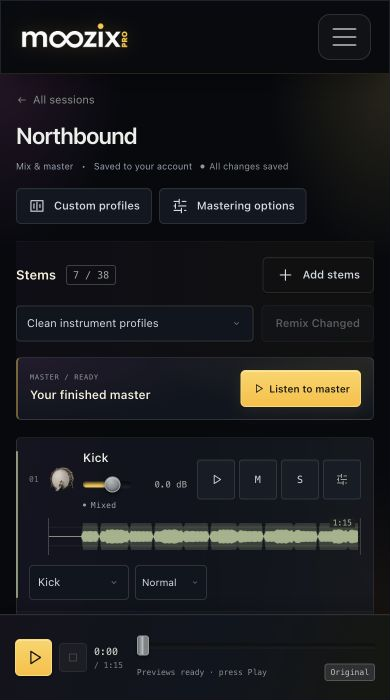
The top navigation collapses behind its menu button. A session shows profile/mastering controls above the tracks. Open FX to use the track controls; the panel can fill the screen while audio continues.
In Custom profiles, saved profiles form a horizontal picker. The reference editor scrolls separately below it. Use the visible grip or move buttons to reorder effects; drag a slider to adjust its value, not the whole panel.
Listen and download #
Press Play yourself to satisfy browser audio permissions. Read loading feedback while previews arrive. Use headphones and verify the active output device if the phone is connected to Bluetooth audio.
After exporting, find the WAV in the browser's Downloads view or the device's Files app. A file can be downloaded without automatically opening in your music library.
If the page becomes difficult to use #
Finish uploads before reloading. Once the work is saved, reopen the direct session URL and try again in a current browser with adequate free memory.
If a control is clipped, unresponsive or unavailable on your device, send support the browser/version, device model and session link. Do not send login credentials. Listening and saved settings should remain separate from any temporary browser preview cache.