Listen, compare, solo and mute tracks
Use raw previews, the mix player, per-track listening and A/B controls without changing your source files.
In this guide
Listen before the first mix #
After upload preparation, use a track's preview button to hear what the file contains. You do not need to mix it just to identify the instrument.
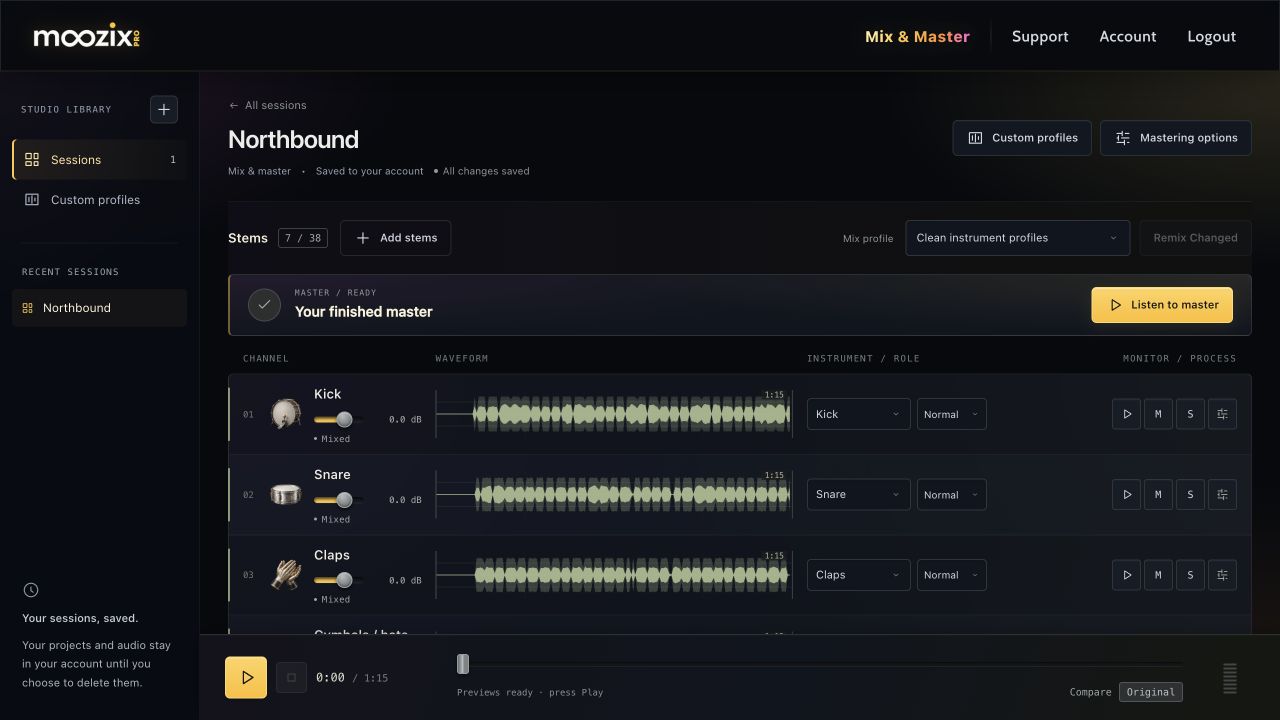
When all uploads finish and nothing is mixing, the bottom player can preview the raw combination. Level and FX adjustments remain unavailable until the stem is mixed.
Play the mixed song #
- Wait until the session is no longer uploading, preparing or mixing.
- Press Play in the bottom transport.
- Use the timeline to move through the song and Stop to stop playback.
- Check the loading status if audio is still being prepared or downloaded.
The browser uses lighter MP3 previews and retains the current versions during the visit. WAV downloads remain full-quality exports. A changed stem loads its new preview; it should not require re-downloading every unchanged file.
Isolate parts with Solo and Mute #
Use Solo to focus your listening on a part and Mute to exclude a part. Clear solo selections when you want to hear the whole arrangement again.
Muting a track affects the song you render; do not leave an important part muted when mastering. Solo is for auditioning. Check muted tracks if a vocal, drum or instrument seems to be missing.
Compare original and processed audio #
Use Compare in the transport to switch between the original and mixed playback. In FX, use Listen to stem and the Original / Mixed · A/B control to focus on one track.
For a finished master, the result window has its own Master / Pre-master mix switch. A louder option can seem better at first; compare tone, clarity and balance as well as volume.